Less on your mind. More done in your day. One app to help you manage your day.
NexDo brings your tasks, calendar, shopping lists, and important moments together — then helps you plan, prioritize, and take action. Create tasks by voice. Ask AI anything.
Plan.
How NexDo works From thought to done —NexDo connects the dots. Tell NexDo what you need, and it helps prepare your next step.
1 Tell NexDo “Remind me to call Speak or type naturally,
2 NexDo understands NexDo figures out the details
Task Time Person
3 ☷ Create tasks
▦ Update calendar
Set reminders
NexDo prepares the right action Ready for you to review and confirm.
4 You stay in control Review, confirm, or adjust anytime. You’re always in charge.
Review • Confirm • Done ✓
Your Daily Brief
Your day, connected.Your next move, clearer. Your tasks and appointments tell one story. Daily Brief brings your priorities, appointments, and suggested next step into one view.
See what’s coming up. Review today’s tasks and appointments.Know what matters. See priorities based on deadlines and your schedule.Choose your next step. Open a task, adjust your plan, or ask NexDo for help.Sample day Good morning, Alex. Recommended next action
01 Finish the launch proposal High priority · Due today · 45 min Start with the proposal in your 11 AM work block.
10 AM Team check-in30 min · Calendar
11 AM Work on the proposal45 min · Task
2 PM Design review30 min · Calendar
Explore this Daily Brief example → A short voice example
Say it naturally.Confirm the next step. Ask NexDo to prepare a task or appointment. Review the details before it’s added.
Explore NexDo AI →
Example conversation
“Add a dentist appointment Friday at 4 PM. Remind me Thursday at 8 PM.”
Ready: dentist on Friday at 4 PM, with a reminder Thursday at 8 PM. Shall I add it?
“Yes, confirm.”
Added to your calendar.Appointment confirmed · Reminder set
Your everyday tools, working together
Less juggling. A clearer plan.
Across separate tools Five everyday activities to keep track of.
Planning Tasks and priorities spread across separate lists.
FRIDAY 17 Scheduling Switching between your calendar and task list.
Follow-ups Keeping calls and messages in your head.
Shopping Items scattered across notes and paper lists.
Important dates Remembering birthdays and occasions on your own.
The NexDo way The same activities, connected in one app.
Tasks · Planning Create and organize tasks, then review priorities in your Daily Brief.
Calendar Review scheduling conflicts alongside your tasks and appointments.
Tasks · Follow-ups Set reminders for calls and messages. Snooze when you need more time.
Shopping List Create and organize lists, then share them as text or a view-only link.
Moments Save important dates and set reminders for scheduled greetings.
Built for real life
One assistant. Every kind of busy.
NexDo fits the day you actually have — meetings, school runs, clients, errands, and the people and occasions that matter to you.
See all use cases →
Helpful by design.You stay in control. Manage calendar connections Disconnect a linked calendar from your profile.
Revoke shared links Turn off a Shopping List view-only link when you no longer want to share it.
Choose your reminders Turn Moments reminders on or off, and snooze reminders for calls and messages.
Manage app permissions Change Contacts and Calendar access in your iPhone settings.
Trust & privacy →
✦ Ready to make every day count? Make more room for what matters with NexDo.
 Scan to get NexDoOpen with your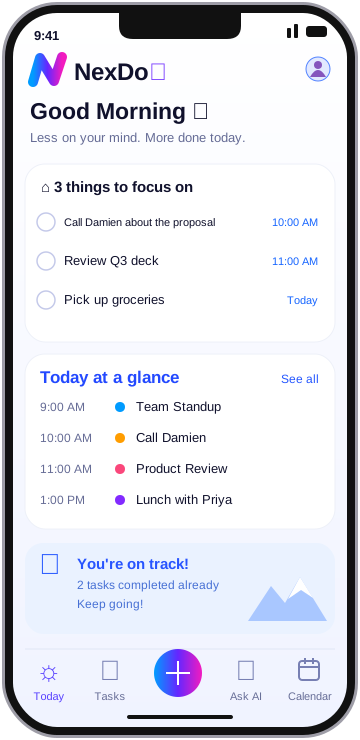
 Sample day